
Orthodontic software
Orthodontic software for treatment planning, clear aligners and bracket bonding
GuideMia orthodontic software plans tooth movement with the roots and bone in view, stages it automatically, and produces the appliance that delivers it — clear aligners for thermoforming or direct printing, bracket bonding trays and anchorage guides, ready for your own printer.
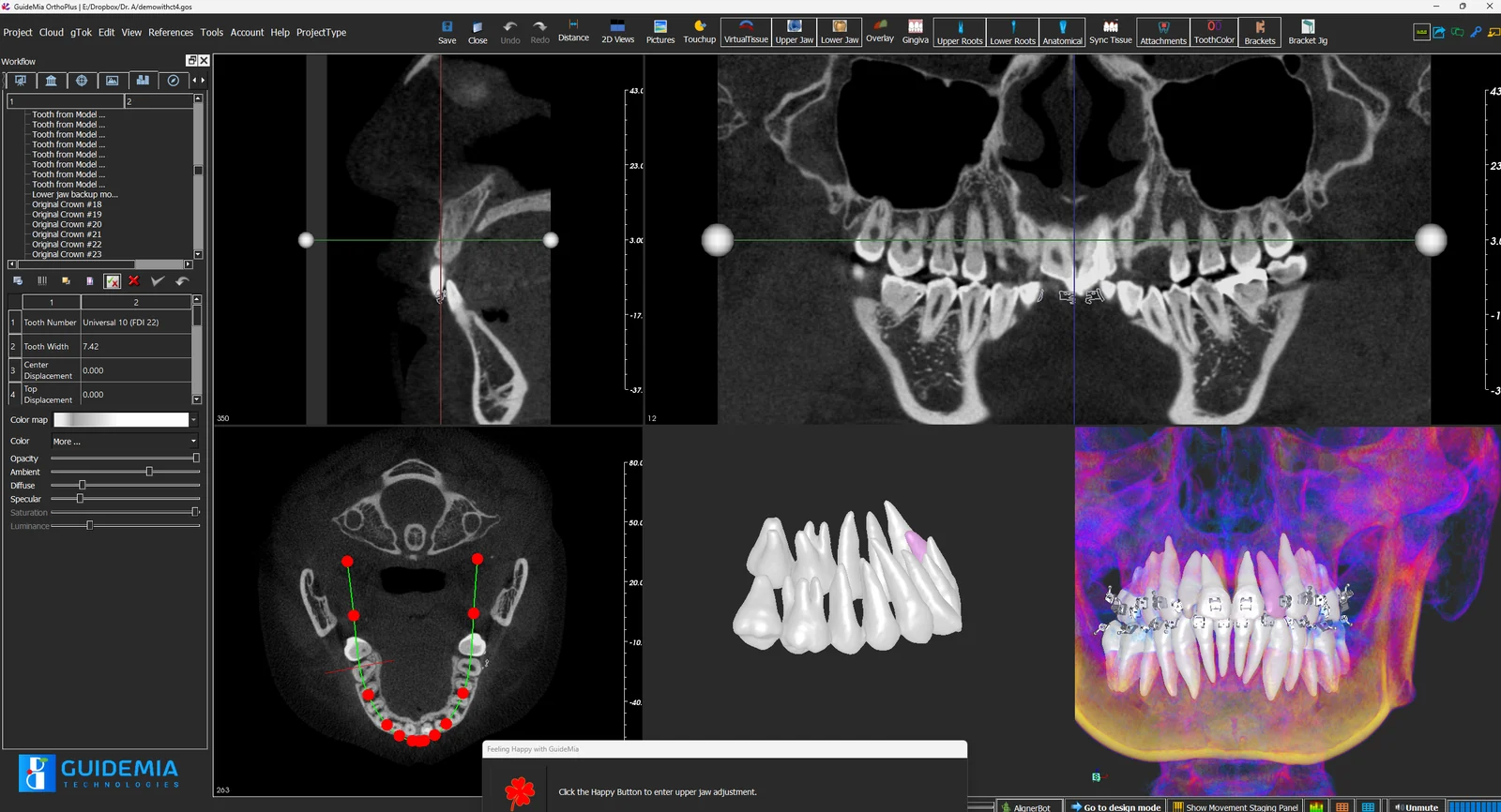
Orthodontic software used to mean a crown-only setup: segment the intra-oral scan, move the crowns, and hope the roots follow. GuideMia OrthoPlus fuses CBCT with the intra-oral and facial scans so the plan is made on a complete anatomical model — crowns, roots, alveolar bone and soft tissue together. Movement is staged against what the bone will allow, and the same plan drives every appliance type rather than one.
GuideMia ships two orthodontic software products on one engine. OrthoPlus is the full design system, for clinics that design their own cases and for labs and aligner manufacturers running production. OrthoClic is the chairside planner: a treatment plan in minutes, a simulation the patient understands, and a hand-off to whoever does the design. GuideMia OrthoPlus is FDA 510(k) cleared (K162850); both products are developed under an ISO 13485 certified quality system.
Clear aligners are the larger half of that work, and the automation is where the time goes or does not. AlignerBot runs segmentation, setup, staging, attachment placement, model generation and trim-path creation from a single click: a medium case is prepared in about a minute and planned, with a full set of aligner models, in about five. The output is fabrication-ready on both manufacturing paths — arch models per stage for thermoforming, or direct-print aligner geometry, which OrthoPlus was the first system to generate automatically. Gingiva is morphed from the original scan rather than a smoothed approximation, and that is what decides whether a direct-printed aligner seats at the margin.
What the orthodontic software does
- AI segmentation of crowns from intra-oral scans and of teeth, roots and bone from CBCT, fused into one model
- Automatic tooth setup and movement staging, with IPR, extractions, expansion and attachments under your control
- Attachments sized and placed per movement, editable tooth by tooth
- Bracket simulation and automatic bracket placement for indirect bonding
- Cephalometric tracing and AI-assisted treatment recommendations
- Arch models for thermoforming and direct-print aligner geometry from the same plan, with trim paths, laser-marking data and retainers from the final stage
- Batch processing of case folders and AlignerBot automation for a design queue
- Treatment plan review, reports and patient presentation — in the software, or in the browser through Cympha Studio
An orthodontic case, step by step
The workflow is the same in OrthoClic and OrthoPlus; OrthoPlus adds the design and manufacturing steps.
01
Import
Open the intra-oral scan, and the CBCT and facial scan if you have them. Model cleanup, hole filling and base trimming run in one pass.
02
Segment
Crowns are segmented automatically. With a CBCT, roots and alveolar bone are added so each tooth is a complete object.
03
Stage
The orthodontic software proposes a setup and stages the movement. Adjust targets tooth by tooth, set IPR and attachments, and step through the sequence.
04
Design
Generate aligner models for every stage, direct-print aligners, or bracket bonding trays. Anchorage implant guides use the same guide engine as Implant Master.
05
Make
Export STL to the printer already in the practice or the lab, and share the plan with the patient, the referrer or the manufacturer.
Who uses GuideMia orthodontic software
Orthodontists and general dentists
Plan chairside in OrthoClic, show the patient the outcome, and either finish the design in OrthoPlus or send the plan out. Aligner-in-an-hour is a real workflow for first-stage cases.
Dental labs and aligner manufacturers
OrthoPlus runs the whole line: batch pre-processing, automatic staging, trim paths, laser marking and direct-print output with the gingival accuracy that decides whether a printed aligner seats. AlignerBot automates the design queue, so throughput grows without headcount.
Design services and solo technicians
One OrthoPlus seat plus a Cympha account is a complete design business. Clinics upload scans, you return fabrication-ready models, they print in-house.
The products
A free planner for reviewing, a chairside planner for clinics, and the full orthodontic software for design and manufacture.
GuideMia OrthoPlus
The full orthodontic software and clear aligner CAD: CBCT fusion, AI segmentation, automatic staging, aligner and bracket bonding design, and production output for both manufacturing paths. FDA 510(k) cleared (K162850).
GuideMia OrthoClic
Chairside orthodontic software for clinics. Automatic setup and simulation in minutes, patient presentation, and a hand-off to a designer through Cympha.
OrthoPlus Planner
Open a case, step through the staging and review movements tooth by tooth. Built for reviewing and presenting a plan; no card and no expiry.
Questions about orthodontic software
- What is the difference between OrthoPlus and OrthoClic?
- Same engine, different operator. OrthoClic is the chairside orthodontic software for the clinician: a plan in minutes, ready to present and hand off. OrthoPlus is the full system with design and manufacturing output, for clinics that design their own cases and for labs.
- Does the orthodontic software need a CBCT?
- No. An intra-oral scan is enough to segment, stage and design. When a CBCT is available, roots and bone are added to the model so movement is planned against the anatomy that limits it.
- Can it output direct-print aligners as well as models for thermoforming?
- Both, from the same approved plan, and both for a hybrid case where some stages are printed and some thermoformed. Retainers are generated from the final stage.
- How long does a clear aligner case take?
- For a medium-complexity case, OrthoPlus finishes preparation in about a minute and the treatment plan plus a set of aligner models in about five. Bracket placement and bonding-guide design take another two.
- Can a lab run it at production scale?
- Yes. Batch processing handles case folders unattended, trim paths and laser-marking data flow to the production line, and AlignerBot automates the design queue.
- Can it design fixed appliances as well as aligners?
- Yes. OrthoPlus places brackets on the digital setup and generates indirect bonding trays and arch models, plus anchorage implant guides. Any bracket brand works, because the approach relies on the slot and the tooth rather than the bracket's outer shape.
- Which printers and scanners does it work with?
- Any. Input is STL, PLY or OBJ from any scanner and DICOM from any CBCT; output is STL for any printer. There is no tied consumable and no proprietary file format between you and your own equipment.
- Is the orthodontic software cleared for clinical use?
- GuideMia OrthoPlus is FDA 510(k) cleared under K162850 and is developed under an ISO 13485 certified quality system.
Cookbooks on this topic
Articles on this topic
Also from GuideMia
Start with the free planner
Install OrthoPlus Planner and step through a staged case, then move up to OrthoClic or OrthoPlus when you are ready to plan and design your own.